How to Get NERD the Clearance Slip for NYSC Mobilization

If you are getting ready for NYSC, chances are you have heard something about the NERD clearance slip. It is the newest additional requirement for NYSC eligibility which was introduced by the Federal Government of Nigeria.

NERD Clearance slip for NYSC

The Nigeria Education Repository and Databank (NERD) is responsible for keeping all academic works such as projects, thesis, and certificates in a verified national database. This initiative is part of a broader effort to digitize academic records and strengthen the integrity of Nigeria’s education system.

The Meaning of NERD Clearance

The NERD clearance slip is the official confirmation that a graduate’s academic work, such as a project, dissertation, or thesis, has been uploaded, verified, and stored in Nigeria’s national education database.

Once your school and NERD verify your details, your record is permanently secured and assigned a unique number called the National Credential Number (NCN) or the National Document Number (NDN). This number makes your record easy to verify anytime it is needed.

The database is managed by the Federal Ministry of Education and it serves several important functions. It supports NYSC mobilization, employment verification, and checks requested by embassies or foreign missions.

Why is NERD Registration Important for NYSC Mobilization?

Starting from NYSC Batch C 2025, only graduates whose project works have been successfully uploaded and verified on the NERD platform will be cleared for mobilization. This policy is part of a national effort to ensure that every name on the NYSC senate list belongs to someone whose academic record has been properly verified.

Latest Update: The NYSC NERD compliance 2025 Batch C has been temporarily paused to allow schools and graduates more time to adjust to the new process. Full enforcement of the NERD system will now begin in 2026.

If you have already completed your upload, your NYSC NERD clearance 2025 Batch C slip will still be valid on the NERD system for future verification.

NERD clearance does not replace the senate list, green card, or call-up letter. It works alongside them as an extra proof that a prospective corps member’s academic record exists in the national education databank.

The process for getting the NERD clearance slip is completely digital via the NERD onboarding portal. You don’t need to visit any office, pay anyone, or submit printed documents. Once your project is uploaded and cleared, your record stays in the system permanently and can be referenced whenever needed.

📌 Advise: Join this NYSC Whatsapp Channel for the latest NYSC news today. The platform provides the latest information on 2026 Batch A and valuable tips for online registration.

Understanding how the NERD Clearance Works

The NERD clearance system was designed to make every graduate’s academic record traceable and verifiable within the national database. To achieve this, both institutions and students have specific roles to play in the process.

At the simplest level, your school handles your academic credentials, while you as a graduate, are responsible for uploading your project through the NERD registration portal. Once both sides complete their parts, your record becomes part of the national databank managed by NERD.

How Your School Participates In The Process

Every tertiary institution in Nigeria is required to appoint NERD officials who manage the process within the school. They include a NERD Focal Officer, a Record Officer, and a Digitisation Officer.

These officials are in charge of uploading the school’s official records such as certificates, transcripts, and approved result sheets. When those records are entered into the NERD system, they are validated and assigned a National Credential Number (NCN) along with security features like QR or frame codes for instant verification.

Although the credential upload component is part of the larger NERD plan, it is being implemented gradually to give institutions time to adjust. For now, the main focus is on student project uploads.

Trending Post:  12 Important Documents Needed For NYSC Camp Registration

How You Participate as a Student

Your role as a graduate is to upload your project report through your personal NERD dashboard. This process is known as NERD onboarding, or sometimes called NERD registration. It certifies that your academic work has been officially submitted, validated, and preserved in the national database.

To do this, you will create an account on the NERD registration portal, log in, and upload your project following the required format. The system automatically organizes your work into sections, such as abstract, introduction, and conclusion, and stores it permanently once it has been verified.

When your submission is accepted, it becomes part of the National Credential Verification System (NCVS), which allows organizations and agencies to verify your academic record in the future.

The Relationship Between NYSC and NERD

The connection between NERD and NYSC lies in record verification. NYSC relies on the Nigeria Education Repository and Databank to confirm that every prospective corps member has an authentic academic record stored in the national database.

While NERD clearance is now a requirement for mobilization, it does not replace any of the usual NYSC registration steps. You will still go through your school’s senate list approval and complete your registration on the NYSC portal as before.

However, starting from Batch A 2026, NYSC will only clear graduates whose project works are listed on the NERD database. Full enforcement, including certificate uploads by institutions will kick off by then.

The goal is simple. Every graduate mobilized for NYSC should have a traceable and verified academic record that can be confirmed instantly anywhere in the country. The NERD NYSC collaboration makes this easy.

How To Process NERD Clearance Slip For NYSC

Getting your NERD clearance slip for NYSC is a simple online process that takes only a few steps if you follow it carefully. The entire procedure happens on the official NERD registration website which you can complete using your phone or a computer.

Step 1: Onboard Yourself on the NERD Portal

Visit the NERD enrollment portal to begin. The NERD onboarding process is divided into three segments: Email, Details, and KYC.

  • Under Email, fill in your email address and create a strong password with at least eight characters. A confirmation link will be sent to your email. Check your inbox and also your spam or junk folder in case the message lands there.
  • After confirming your email, you’ll be taken to the Details segment. Fill in your personal details exactly as they appear on your school records. Once you’re done, proceed to the next segment.
  • Under the KYC segment, provide your contact details, address, and next of kin information. You’ll also upload your passport photograph, means of identification, and attestation letter.
  • The means of identification can be your NIN, international passport, or driver’s licence. The attestation letter can be your certificate or any document communicated by your school.

Once everything is filled correctly, submit your application and check your email for the submission status.

To Avoid Upload Errors:

  • Passport must be in photo format and not more than 300kb
  • Means of ID must be in photo format and not more than 350kb. Reduce the file size here.
  • The attestation letter must be in PDF format and less than 350kb. Convert into PDF here.

After submission, you will get an email notification which confirms your enrollment and the login details you provided during the onboarding process.

How to get NERD Clearance slip for NYSC

Your submission will be reviewed and approved before you can proceed to the next stage below. Sometimes, they may not send a follow-up email after they’ve completed the review. If you don’t get any other email from them, you can try proceeding to the second stage below after 24 hours.

Trending Post:  How To Print NYSC Addendum For Camp Registration

Step 2: Upload Your Project on NERD Portal

Congratulations on completing the first stage of the NERD registration above. Now here is the second part:

  • Visit https://ned.gov.ng/login and log in using your registered email and password.
  • Once the dashboard opens, check that your name, institution, and department are correct. If you notice any mistake, send an email immediately to NERD support for correction.
  • Select the type of academic work you are uploading from the list of Project, Dissertation, or Thesis. For undergraduates, choose Project.
  • Enter your project title, meta title, a brief description, and keywords that describe your work.
  • Note: Meta title is the version of your project name that will show up when searched on the NERD database. Make it simple and straight to the point, while incorporating the main keywords.
  • Next, upload (in photo format) the signed certification page of your project. This is the page that carries your name, your supervisor’s name, and your HOD’s name with their signatures.
  • After that, copy and paste your project into the text boxes provided for each section such as abstract, introduction, literature review, methodology, results, and conclusion.
  • Before now, the PDF upload of your project was optional but it looks like this is now compulsory. So, ensure to upload the complete file.
  • Once you’ve filled in all sections correctly, click Submit Project.

The system will automatically organize your work and store it in the national database

How to Print Your NERD Clearance Slip

After completing your upload, the next step is to print your NERD clearance slip. This slip is the official proof that your project has been uploaded and validated by the Nigeria Education Repository and Databank. It also confirms that you are now NERD compliant for NYSC mobilization.
To do that:

  1. Return to your dashboard and click “Process NERD Clearance”.
  2. Add the details of your supervisor and head of department if the system requests them.
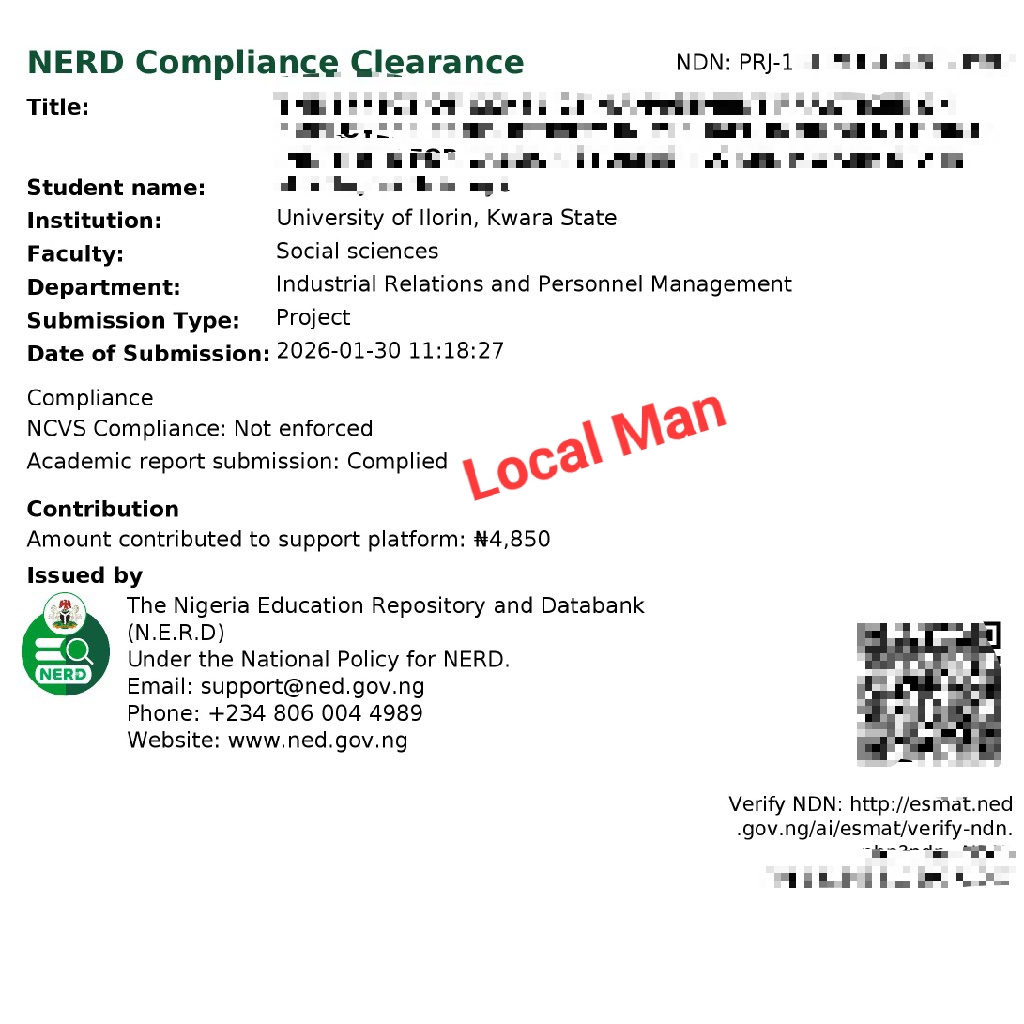
  3. Once everything is verified, your NERD clearance slip will be generated instantly with a National Document Number (NDN).
  4. You can then print it directly from your browser, save as PDF, or send to your email for future use.
Sample of the NERD clearance slip for NYSC
Sample of the NERD clearance slip

Where and When to Submit Your NERD Clearance Slip

As part of your NYSC camp documents, the NERD clearance slip will be required during registration at the orientation camp. It serves as confirmation that your academic work has passed the NERD verification process.

Print at least one physical copy and keep a digital backup on your phone or email. The slip may also be requested later for employment verification or academic reference purposes, so store it carefully.

What This Means for Prospective Corps Members

Once you have your NERD clearance slip, it means your project upload has been reviewed, validated, and accepted into Nigeria’s national education repository. You are now cleared for NYSC registration.

Your school will handle the upload of your academic credentials later as part of the next phase of the NERD implementation. For now, NYSC focuses mainly on the project upload and clearance component.

NERD Clearance Slip For Married Women

While registering on the NERD portal, many married female prospective corps members often get confused about which name to use, especially since they will be registering as married during NYSC registration.

When completing your NERD clearance, always use the same name that appears on your school records. NERD verifies every record directly from your institution’s database, so the name on your academic documents must match what your school submitted. If your credentials were issued in your maiden name, that is the name you should use for NERD compliance.

Trending Post:  How to Purchase Your Quality NYSC Camp Kit at Affordable Prices

For NYSC registration and other official purposes where your marital name is required, you can present your change of name affidavit and newspaper publication as supporting documents. But for NERD clearance, only the name on your school record is valid.

Helpful Questions on NERD Clearance Slip for NYSC

If you are still unsure about how NERD clearance works or what it means for your NYSC process, the answers below will help clear your doubts.

Is NERD clearance slip compulsory for NYSC?

Yes, NYSC NERD clearance is compulsory for prospective corps members. The Federal Government made it mandatory for all graduates who wish to be mobilized for NYSC. Without it, your name will not be cleared for deployment. However, it has been waived for 2025 Batch C due to the timing of the policy.

Do I need to upload my certificate now?

No, you are only required to upload your project. Your school will handle the upload of your certificates and transcripts through the National Credential Verification Service (NCVS).

What is the difference between NERD and NCVS?

NERD is the Nigeria Education Repository and Databank, the main system that houses all academic records.
NCVS, which stands for National Credential Verification Service, is a unit within NERD that handles the official validation and authentication of academic credentials.

How long does NERD clearance take?

Once your project is correctly uploaded and approved, your clearance slip is usually generated within minutes. However, if your supervisor or HOD details still need to be confirmed, it may take a little longer.

What if I graduated before this policy took effect?

Even if you graduated before NERD clearance became mandatory, you are still required to upload your project. The policy applies to all graduates seeking NYSC mobilization, regardless of when they finished school.

Does the NERD policy apply to part-time or exempted graduates?

Yes. NERD clearance is for all graduates from accredited tertiary institutions, whether full-time, part-time, or distance learning. Even if you are exempted from service, your academic work must still be uploaded and verified under NERD as part of the national academic record system.

What happens if I skip NERD clearance?

If you skip NERD clearance, your academic record will not appear in the national database, and you will not be cleared for NYSC mobilization. Every prospective corps member must have a verified record on the NERD system.

Why You Should Take NERD Clearance Slip Seriously

The NERD clearance process is not just another requirement to tick off before NYSC. It is a major step by the Federal Government to build a reliable and traceable academic record system for all graduates in Nigeria.

By completing your NERD clearance, you are securing your academic work in a national database where it can always be verified whenever needed. This protects you from issues like result forgery, lost records, or unnecessary verification delays in the future.

Once your project is verified and stored, it stays there permanently and can be accessed by NYSC, employers, and even foreign missions when required.

NERD clearance is simple, fast, and completely online. If you can use your phone to browse or access social media, you can complete the process on your own.

Even though the NYSC NERD compliance 2025 Batch C is not being enforced right now, PCMs are advised to get familiar with the system early so the transition in 2026 will be smooth. The NERD onboarding portal remains open for voluntary uploads during this pause, which helps students get used to the digital process before it becomes compulsory.

Oya, share am with other PCMs

Join the Conversation...

Your email address will not be published. Required fields are marked *

Characters: 0/1000

223 thoughts on “How to Get NERD the Clearance Slip for NYSC Mobilization”

  1. Good morning. Please this title,meta title,meta keywords,meta description are all confusing to me. What exactly does it mean and how do I fill it

    1. It’s confusing you because you’re not reading. I explained it up there what meta title and keywords means. For description you should know it’s asking you to describe what your project is all about.

  2. Good afternoon
    Pls local man for like a month plus now am finding is hard to open NYSC PORTAL hv use different link too on my phone not to even talk of opening my dashboard hv use different browser still not going…and I want to check my dashboard for the correct of DOG
    Don’t know what to do..please help

  3. Is it advisable to start now or next year because I saw a flirt that said everything is void until January ,next year. Idk how true that is.

  4. Someone registered on 6th December and another person on 10th December but when they want to login it says invalid credentials but the email and password is exactly the same with the verification email they were sent after enrollment. What can they do? Is it the new normal thing?

    1. Good morning Ebere. I have no specific guide on that although the link for the first step above also includes the section for foreign graduates.

      Meanwhile, you might want to wait till January 6 for NERD’s update.

  5. Good afternoon
    The NERD new that you posted on your channel it says the portal will be opened on January 6th and students should not enroll before that time what about we that have uploaded and gotten our NERD clearance slip hope we are not affected, hope our slip will be acknowledge in camp next year

  6. Please sir I just want to ask about the NERD how we should go about it like I we supposed to do it on our phone by oursafe or go to coffee center because I have be trying my on my phone for weeks now is not working, I am done with the first level that they sent an email to verify after that I verified to the next level after filling all the necessary details to submit it is not working I have be trying it. I don’t if is the network

    1. This same article is what have guided many others with their project submission so I don’t know why yours is different. You might want to wait till January 6 for the latest update from NERD.

    1. Meta title is the version of your project name that will show up when searched on the NERD database. Make it simple and straight to the point, while incorporating the main keywords.

  7. Adeyinka Barakah omolola

    Good day sir or ma I .my issue is my name on my project work it written as omolara and on certificate it written as omolola though I also corrected it later to the omolola hope it not going to affect me

  8. Ofili STEPHEN IFECHUKWUDE

    Good day local man I just start following your guild on nerd clearance stuff. My issue now was my name arrangement after the first step my name was arranged as “ifechukwude Stephen Ofili’’ instead of “Ofili stephen ifechukwude’’ I don’t know if this will be a problem to me

  9. Good morning
    Please UNN has not said anything concerning Nerd md even when I asked my HOD he said he knows nothing about it
    Must we wait for them to release a memo ?
    What about those that registered when the Nerd thing began, will they have any issue base in the fact that UNN has not said how we should go about it

  10. Good evening sir, thanks for all you do
    I had already put in all my project details on the nerd portal but when I tried to submit, it was showing that I didn’t indicate my faculty.
    Then I went back to the list of faculties on the portal but the faculty created for my department in school isn’t in the portal at all.
    I tried reaching out to the departmental rep but she said she doesn’t know how to go about it.
    Please what can I do?

  11. Sir,
    Pls, that part that requires an image upload, what if a person’s project doesn’t have a picture or an image. What can the person upload there as an Image or picture?
    Can we leave it vacant?

  12. good evening local man sorry if I might be disturbing but I just concluded everything I saw on your page wi it all your directions but I still don’t understand why it’s saying, Academic report submission: Not complied. Upload your main file first… please and hat other main file are they asking for cause I have checked back and forth for where to add main file I can’t see except the one with optional file upload or is it now a must cause it’s saying not complied or what can I do please help me out , thanks

  13. Hy local man,I making my nerd but I went to print my slip is showing me, academic report submission:not compiled any problem pls

    1. Please read the article with detailed attention. The links to the tools for resizing and conversion were linked in the part where I discussed about file types and size.

  14. Adewumi Ayomide Adetunji

    Good Day Local Man, I have tried several times uploading my project on the Nerd Portal, it says my submission can not be processed at the moment…. Please what could be the issue?

  15. Good morning,local man
    Concerning the nerd please how many days will i have to wait for the link to upload my project because am done with the first step
    Thank you

  16. Ndu-metu Kosisochukwu

    please concerning the nerd

    that place that have supervisor signature
    hod signature
    faculty officer signature
    external supervisor signature

    Please must they all sign or

    only one signature is enough

  17. I’ve finally done my nerd I’ve been procrastinating but your word today actually ginger-ed me to finish mine today I’m really grateful, though it wasn’t easy o but ahead ahead lol

  18. Good afternoon local man, As a foreign graduate this is the first I am hearing of this NERD verification, is this still applicable to foreign graduates or does this not concern me? Thank you

  19. Good morning local man, I submitted my project on Friday night and it’s still reading submission in progress. (10%) Please what should I do?

  20. Morning,how are you local man if person want to upload project on nerd,and his project was done in group like for education students would he edit it and remove his colleagues name or he will upload it how it is

    1. Excellence Naomi Ohihon-Joseph

      I have gotten an email from NERD that my details is under review

      Should I go ahead and upload my project work, or I should wait for NERD approval?

    2. Jovita Chinazaekpere Duru

      Hello sir I tried to register for my friend though they did their onboarding around October but if I login their email and password it’s showing me invalid credentials what’s the issue

  21. I edited my institution and my portal showed updated successfully but it’s not reflecting. Could this be a glitch?

    The system said I can’t edit before but now it’s showing me that it has updated successfully but it isn’t reflecting. How do I go around it?

  22. Hi local man , good evening have tried all day to upload my certificate and figure but it’s writing invalid file name and file type not suitable.
    What am I to do

  23. Hi local man, i am done with the onboarding process but when i opened my dashboard to upload my project, the arrangement of mt name is not the same as the one in my certifcates. My surname comes last, so can i go ahead with my project upload

  24. Please for the attestation letter, I don’t have my certificate yet. can I use a pdf file of my student profile downloaded from my school website? The student profile shows my school details like course and matric, it also show academic info like cgpa, course, date of entry, course and program status.

  25. Hi local man, I have uploaded my project on nerd portal but when I finished the upload, it shows not complied but on my submission from the dashboard it shows that I’ve submitted, I think my HoD and supervisors details are yet to be updated on their portal, because it still shows not complied when I try to print the clearance slip!

  26. Hello local man
    Thanks for your timely updates it as been useful.
    But I am facing little challenge filling the details for the NERD in the aspect of the program done in school the options there are:
    Undergraduate, postgraduate diploma, postgraduate Masters…..
    So I picked undergraduate, but once I upload for the kyc, it keeps taking me back to the filling of details.

    How best do I attend to this?

  27. Good day local man, please am stuck in verifying if am a human. I have repeated the actions severally but am still stuck there. What should I do please.

    1. Good day sir
      Please you didn’t give us instructions on how to fill other segments
      Like the meta title, meta description, meta keywords, figures(atleast one picture)
      Or are we to just ignore that and submit the ones we have filled

      1. Those are pretty simple to understand. Meta is to help with visibility when searched so ensure you write the title of your project and describe it properly.

        For example, a project titled “Federalism and the Nigerian Economy” will definitely have “Federalism” and “economy” as important keywords. For the figure, it means any diagram or picture from the project.

    2. I can’t remember them asking you to upload your project. They only said to upload the signed page of the project. If you don’t have that, you should go to your school.

  28. Hi local man I just concluded the Nerd registration, I followed the steps as written in your article but when I got to that stage of processing clearance
    It brought out submitted instead of complied , hope I’m safe sir

  29. Hi Local Man,
    Please if my school have not uploaded our Senate list yet, can I also do this need clearance?
    Because when I go to attestation letter stage, I don’t know what to upload and you said
    “The attestation letter can be your certificate or any document communicated by your school.”
    My school hasn’t said anything or mobilize us, they’ve not uploaded our Senate list self till next batch when nysc open for mobilization again.

    What do you think I should do sir?
    Upload any of my documents? Or wait for my school to mobilize and upload our Senate list

  30. Hi, local man.

    Just tried to upload my project but it showed “timeout”. Do I proceed to re upload? Maybe it’s a network issue.

  31. After enrolling, I got the email notification of my username and password but when I try to login… it’s says invalid credentials…

  32. Good morning local man, i just submitted mine last night but haven’t seen anything yet, how long does it take pls ?
    Thanks for your response

      1. Like you did not get me sir, I’ve submitted it already, there’s no any next step i can proceed to, the only thing it’s showing when i visit the dashboard is “Go to upload” which I’ve done that alteredy, that’s why I’m asking wether takes them much time to review the work cos i even try to upload again what they show was “we found an existing submission that appears to be the same or very similar , please edit the existing entry instead of creating a duplicate.

        1. I’ve seen someone else with your type of complaint but I don’t seem to know why that is happening. I’m currently chatting with someone who did it successfully to know what they did to differently.

  33. Good evening local man, I salute 🫡 you wella.
    I tried uploading my statement of result as attestation letter, but it won’t accept it, it kept saying file not accepted, pla what can or should I do?
    Thanks

  34. Good day sir, i just did my NERD clearance now, after clicking submit it show that my submission has been created successfully, when i still login again the button of “Go to upload” is still appearing, like there’s no any change like I’ve done it already, I don’t know if that’s how the thing is or i still have to do it again.

    1. Good day sir, please I registered for Nysc with this batch C but I did not get call up number hoping I will go with C2, is it necessary for me to register NERD ?